


Arrow Cube: finding the order that clears the whole cube
Published August 9, 2026
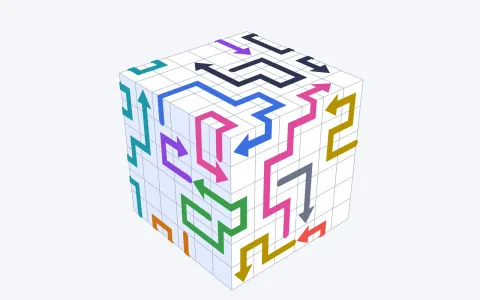 Arrow CubeClear every arrow off the cubePlay now
An arrow puzzle has exactly one rule, and once it clicks the whole genre opens up: tap an arrow and it slides along its face in the direction its head points, then leaves the shape — but only if nothing stands in its way. If another arrow sits on that line, or a wall of the shape rises above the path, your arrow bumps back and stays put. That is the entire game in Amaze GO!, Arrows GO!, Cube Away and Arrow Cube alike. Which means the puzzle was never about tapping — it is about the order you tap in.
The one rule: follow the head to the exit
Before every tap, run the same silent check: where does this arrow's head point, and is the line between the head and open space completely clear? Only two things can stop a shot — another arrow sitting somewhere on that line, or a wall of the shape standing above the path. Clear the blocker and the way opens; tap without checking and the arrow bumps back.
Unlike Arrow Digger on the same portal, a bump-back in Arrow Cube costs you nothing but time — there is no life counter punishing a miss. That makes it tempting to brute-force levels by tapping everything. Resist that on anything past the early boards: on a fine grid with long, tangled arrows, random tapping teaches you nothing about why a level is stuck, and the 'why' is exactly what the harder levels test.
In Arrow Cube the board is a solid you spin with your finger. Drag anywhere to rotate it, pinch or scroll to zoom. The rule reads instantly if you come from a flat arrow game — the spinning is the twist.
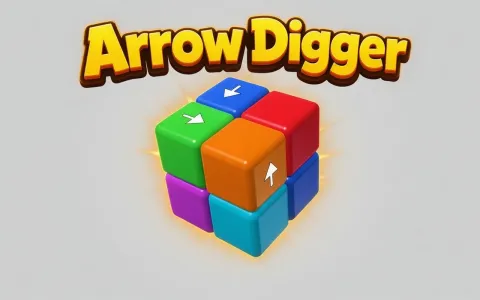 Arrow DiggerDig every cube out of the blockPlay now
Read the head, ignore the tail
The most common mistake in any tap-away style game is judging an arrow by its overall shape. Arrows in Arrow Cube can be long — up to a dozen cells, with several right-angle turns — and a single arrow can bend twice inside one face and then fold over an edge onto the next face. A long arrow can start on the top of the cube and finish somewhere down the side.
None of that matters when you fire. Only the head's direction decides where the arrow goes and what can block it. The tail is decoration: it tells you which cells the arrow occupies (and therefore what it blocks for others), but not where it will travel.
So read every arrow twice. Once for its head — where it wants to go, and whether that path is clear. Once for its body — which other arrows' paths it is currently sitting on. An arrow that is easy to fire but blocks nothing can wait; an arrow whose body pins three neighbours is the one worth freeing early.
Spin before you tap
The cube always opens facing you on its busiest-looking side, and the natural instinct is to start firing whatever is in view. But the arrow you actually need is often one turn away — arrows hide on the back faces, and a path that looks clear from your angle may be blocked by something you cannot see yet.
Make a slow full rotation the first move of every level. You are looking for two things: arrows whose heads point straight at open space with nothing in the way (free wins), and pairs of arrows that interfere with each other (the real puzzle). Thirty seconds of spinning routinely saves minutes of confused tapping.
This matters more as the levels grow. Arrow Cube runs from a plain 3×3 cube up to a 9×9 grid, and the shape itself stops being a cube — rectangles, two cubes grown together, crossed bars, stairs, carved blocks. On the carved and compound shapes, whole clusters of arrows can be invisible from any single angle.
Walls are permanent — use them as anchors
There are two kinds of blockers, and they behave completely differently. An arrow blocking another arrow is a temporary problem: fire the blocker and the path opens. A wall of the shape standing above an arrow's path is permanent — that arrow will never fire from that spot, no matter what else you clear.
That sounds like bad news, but it is actually the level talking to you. A wall-blocked arrow tells you which part of the shape the solution has to route around, and it narrows the search: whatever the intended order is, it does not start there. Treat these arrows as fixed scenery while you work out the rest.
The other classic knot is two arrows pointing at each other. One of them has to go first — and only one of them can. Trace each one's path past the other: whichever has a clear exit once its rival is imagined away is the one to fire. Work out that single decision and the rest of the level usually unlocks around it.
Cube Away strategy: work the edges inward
If you are carrying habits over from Amaze GO!, Unpuzzle or Cube Away, the big one transfers directly: clear the outer ring first. Edges have the shortest escape routes here too — an arrow near an edge crosses fewer cells on its way out, so fewer things can possibly block it.
Firing edge arrows early does two jobs at once. It banks the easy clears, and it strips away the bodies that were lying across the paths of the inner arrows. Levels tend to unravel from the outside in: each ring you remove turns the next ring into the new outside.
When you do get stuck mid-level, do not keep re-tapping the same arrow hoping for a different answer. Something specific is on its path. Spin the shape, find the exact blocker, and shift your attention to freeing that instead — the game is a chain of small dependencies, and the stuck arrow is just the last link.
The long game: 300 levels in waves
Arrow Cube's difficulty climbs in waves of five levels, so there is a breather after every peak instead of one relentless ramp. If a level just wrung you out, the next one is usually gentler — a good rhythm for the one-more-level habit, and a bad reason to quit right after a hard one.
Over the 300 levels the grid gets finer, the arrows get longer and more tangled, and the shapes drift further from a simple cube. The reading skills stack in the same order this guide does: head-first reading carries you through the early boards, systematic spinning through the middle, and blocker-chain logic through the late compound shapes. Past level 300 the game keeps serving fresh layouts at top difficulty, so there is no wall at the end.
Progress is saved locally in your browser, so you can close the tab mid-wave and pick up exactly where you left off.
Play Arrow Cube free in your browser
Arrow Cube runs on crokocat with no download and no sign-up, on desktop, phone or tablet. Left-drag to rotate and scroll to zoom on desktop; swipe and pinch on mobile; click or tap an arrow to fire it.
If you like this family, Arrow Digger on the same portal turns the idea inside out: instead of arrows sliding across the surface of a shape, every cube of a solid figure carries one arrow and the whole cube flies out when you tap it — with three lives making every guess expensive. Same one-tap rule, a different puzzle to read.
Frequently asked questions
How do you play an arrow puzzle game like Arrow Cube?
Tap an arrow and it slides along its face in the direction its head points, then leaves the shape — but only if the path is clear. If another arrow or a wall of the shape stands in the way, it bumps back. Drag to spin the cube, find arrows with clear exits, and clear blockers in order until the shape is empty.
Why won't my arrow move when I tap it?
Something is on its path: either another arrow sitting on the line the head travels, or a wall of the shape rising above it. An arrow blocked by another arrow fires once you clear the blocker. An arrow blocked by a wall will never fire from that spot — solve the rest of the level around it.
Is Arrow Cube the same as Amaze GO or Tap Away 3D?
Same family, different board. Amaze GO! and Arrows GO! are flat boards of arrows; Tap Away 3D and Unpuzzle remove whole blocks from a solid. Arrow Cube sits between the two: the arrows are drawn on the surface of a 3D shape, bend inside a face, wrap over edges, and slide along the skin instead of being pulled out of the middle.
How many levels does Arrow Cube have?
300, from a plain 3×3 cube up to fine 9×9 grids and compound shapes, with difficulty climbing in waves of five levels. Past the last level the game keeps serving fresh layouts at top difficulty.
Is Arrow Cube free, and does it save progress?
Yes on both counts. It is free on crokocat with no download and no sign-up, runs in the browser on desktop, phone or tablet, and your level is saved locally so you can pick up where you left off.
Guides & tips
Play it here
- Arrow Cube — Clear every arrow off the cube
- Arrow Digger — Dig every cube out of the block